On this page
When I was in 10th grade, I came across a Namu Wiki article mentioning that easter eggs were hidden in the Hancom Typing Training resources. Curious whether the easter eggs existed only as dummy data or if there was actually a way to trigger them in the program, I decided to reverse engineer it. The program’s structure was simple enough that I was able to find the key combination fairly easily, and I posted the results to the 코딩이랑 무관합니다만 group on Facebook.
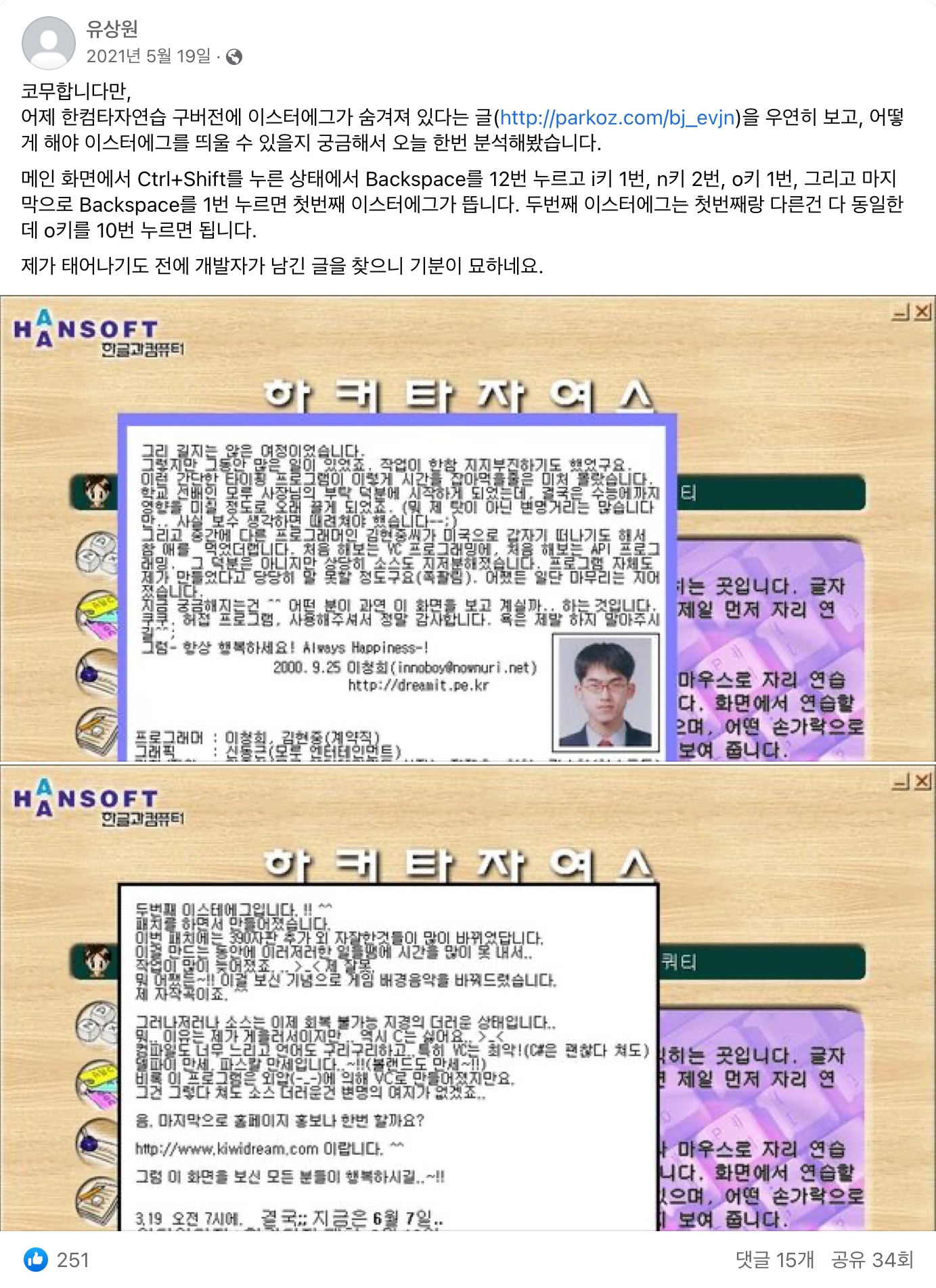
After starting this blog and wondering what to write about, I figured documenting the Hancom Typing Training reversing process would make a good post. Since I hadn’t kept any notes from two years ago, I went through the reversing process again — and this time I also found a key combination I had missed back then.
Before We Begin
This post is based on Hancom Typing Training 2005. Versions 2002 and 2004 should have a similar structure. Starting from version 2007, the easter egg-related code was removed.
As mentioned above, the program is simple enough that even without any formal study of reverse engineering, I was able to find the easter eggs easily using just IDA’s decompiler. If you’re interested in reverse engineering, I’d encourage you to try analyzing it yourself before reading through my write-up.
Browsing the Resources
Let’s take a look at the easter egg-related resources using Resource Hacker.
- First easter egg
169 (0xA9)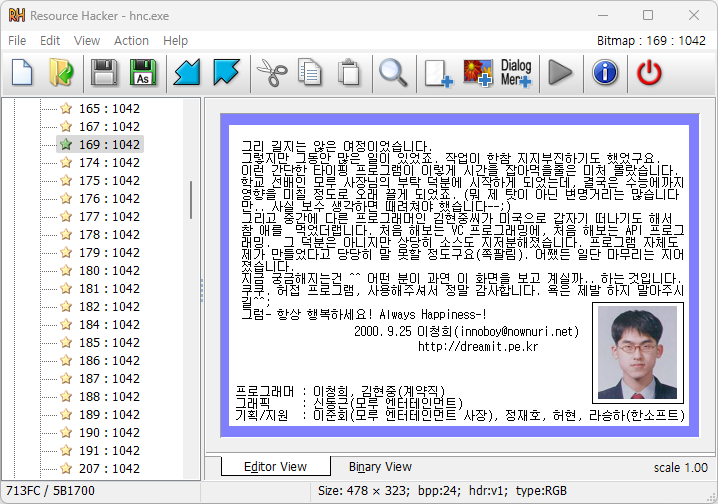
- Second easter egg
346 (0x15A)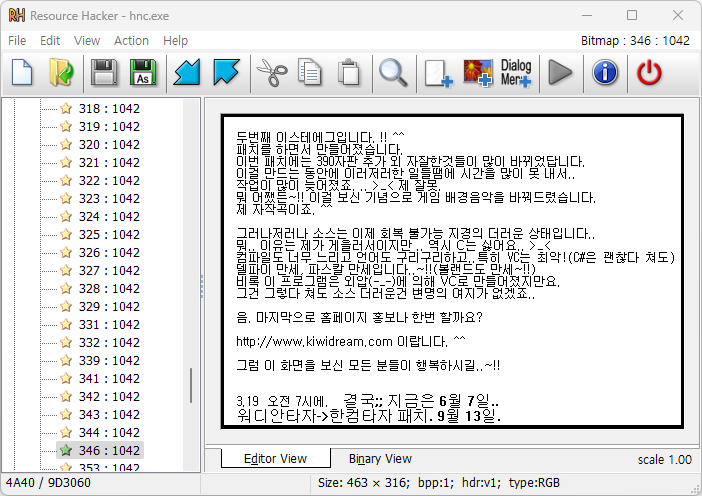
The note about it being developed right before the CSAT exam is quite something.
Code That Displays the Easter Eggs
LoadImageA
Let’s quickly analyze the easter egg-related portions. To display an easter egg on screen, the program would need to call an image-loading function.
Let’s look at the cross-references to the LoadImageA function.
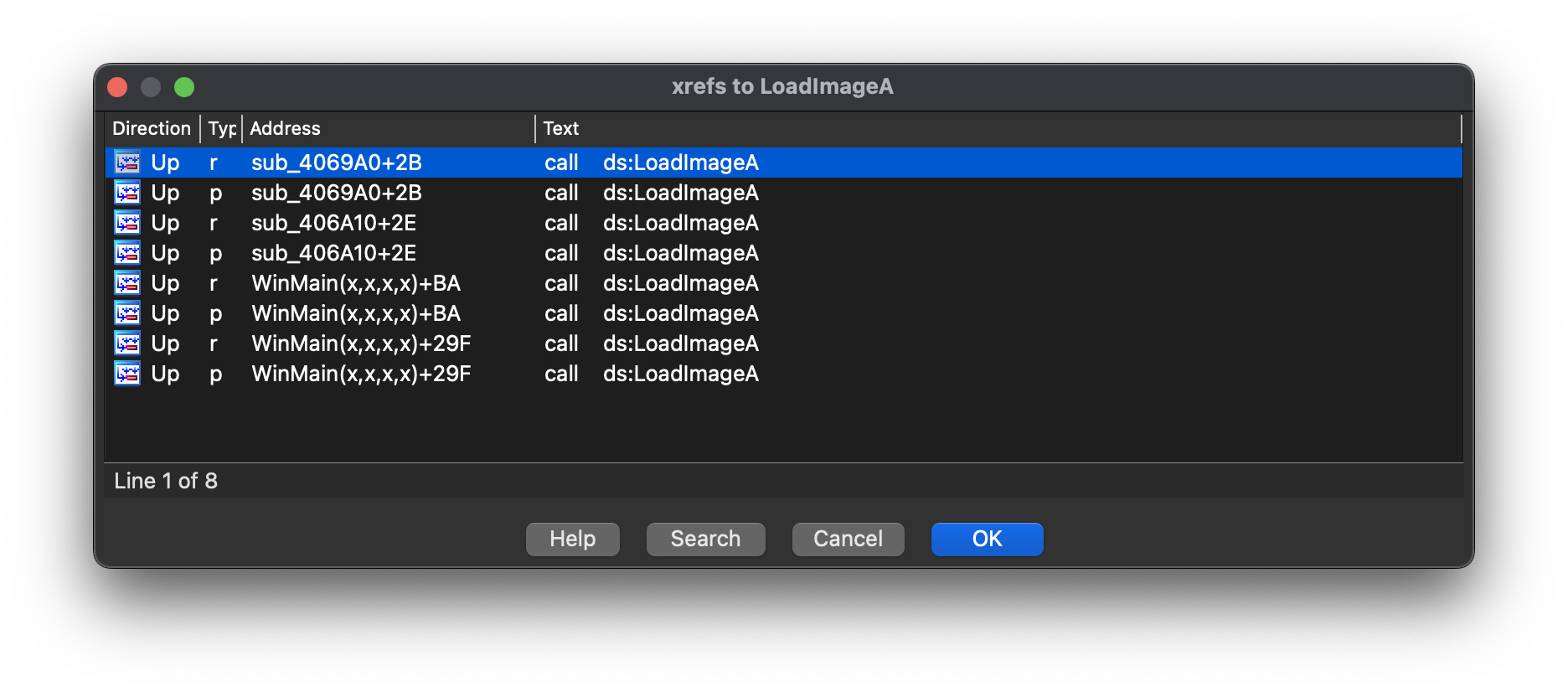
There are 4 xrefs. Let’s go through them one by one.
Decompiled result of sub_4069A0:
HANDLE __cdecl sub_4069A0(LPCSTR name, _DWORD *a2)
{
    HANDLE result; // eax
    CHAR Text[256]; // [esp+8h] [ebp-100h] BYREF

    *a2 = 0;
    result = LoadImageA(hInst, name, 0, 0, 0, 0x10u);
    *a2 = result;
    if ( !result )
    {
        sprintf(Text, aS_0, name);
        return (HANDLE)MessageBoxA(0, Text, aLoad, 0);
    }
    return result;
}
It passes LR_LOADFROMFILE (0x10) as the 5th argument to LoadImageA. This appears to be a function that loads and returns a file whose name is passed in via name.
Easter egg images are loaded from resources, not from files, and since the only xref to sub_4096A0 is sub_4069A0(aHnctlogoSys, &dword_932120); at WinMain+22F,
this is likely a function for loading the logo. Moving on.
Decompiled result of sub_406A10:
HANDLE __cdecl sub_406A10(LPCSTR name, _DWORD *a2)
{
    HANDLE result; // eax
    CHAR Text[256]; // [esp+8h] [ebp-100h] BYREF

    *a2 = 0;
    result = LoadImageA(hInst, name, 0, 0, 0, 0x2000u);
    *a2 = result;
    if ( !result )
    {
        sprintf(Text, aS_0, name);
        return (HANDLE)MessageBoxA(0, Text, aLoad, 0);
    }
    return result;
}
Almost identical to sub_406910, except it passes LR_CREATEDIBSECTION (0x2000) as the 5th argument to LoadImageA.
It has 172 xrefs. Let me finish analyzing the remaining xrefs to LoadImageA first, and if they don’t appear to be related to the easter eggs, I’ll come back to this one.
Decompiled result of WinMain+BA:
v18.hIconSm = (HICON)LoadImageA(hInst, name, 1u, 16, 16, 0);This is code for loading an icon. Moving on.
Decompiled result of WinMain+:
v19.hIconSm = (HICON)LoadImageA(hInst, name, 1u, 16, 16, 0);Also icon-loading code. Let’s go back and analyze sub_406A10.
sub_406A10
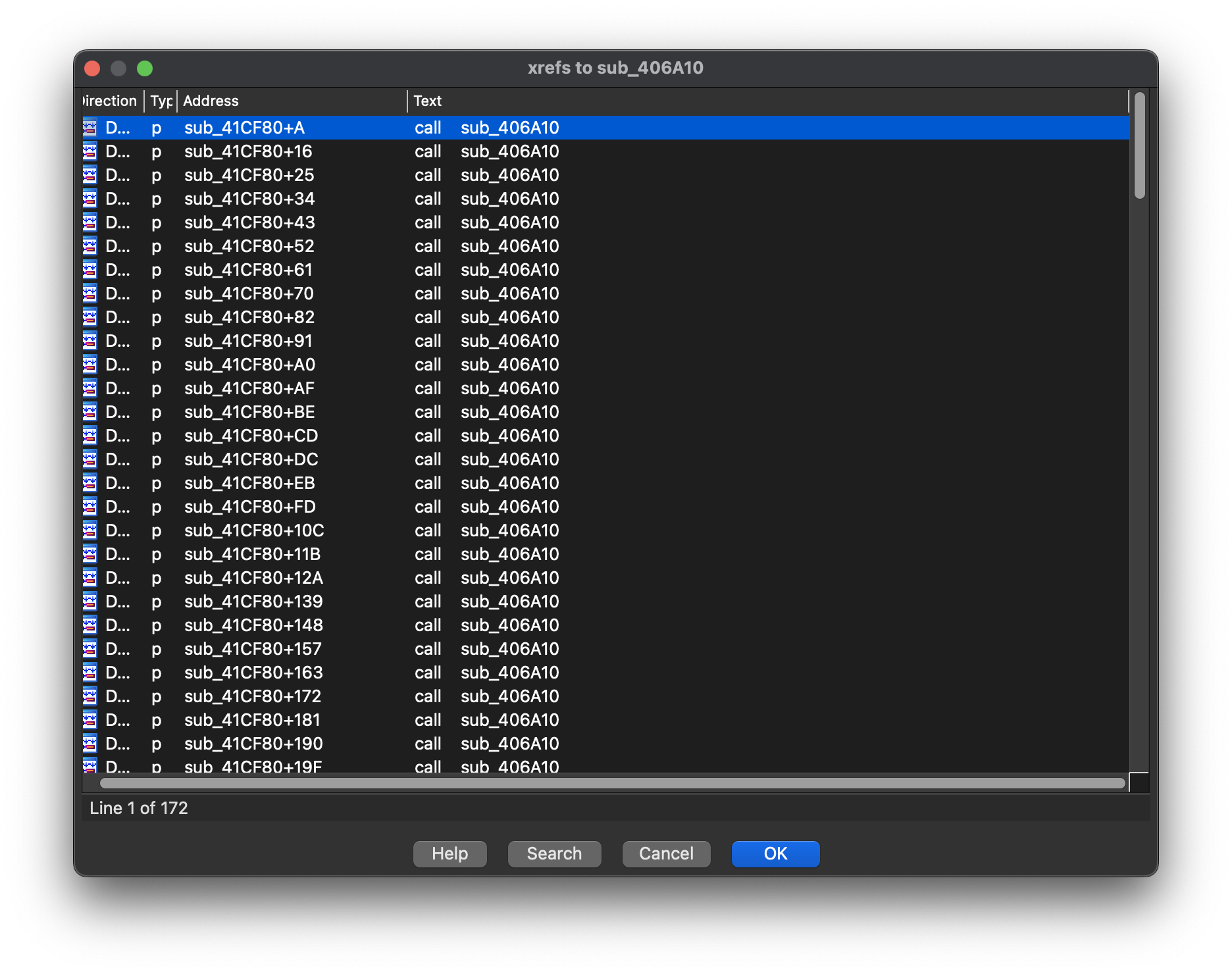
With 172 xrefs I was initially worried, but since they all appear to be called from sub_41CF80, the amount I actually need to analyze should be more manageable than I thought.
sub_41CF80
HANDLE sub_41CF80()
{
    sub_406A10((LPCSTR)0x14C, &dword_C278E4);
    sub_406A10((LPCSTR)0x75, &dword_C2796C);
    sub_406A10((LPCSTR)0xAF, &dword_C0E8C4);
    // ...
    sub_406A10((LPCSTR)0xA9, &dword_C29B40);
    sub_406A10((LPCSTR)0x15A, &dword_C278E0);
    // ...
    sub_406A10((LPCSTR)0x14B, &dword_9305F4);
    sub_406A10((LPCSTR)0x153, &dword_45B37C);
    return sub_406A10((LPCSTR)0x158, &dword_461E6C);
}
As confirmed with Resource Hacker, the resource IDs of the easter eggs are 169 (0xA9) and 346 (0x15A).
It looks like the resources are loaded via sub_406A10 and stored in dword_C29B40 and dword_C278E0.
Analyzing the code that accesses these addresses should reveal the conditions for triggering the easter eggs.
dword_C29B40
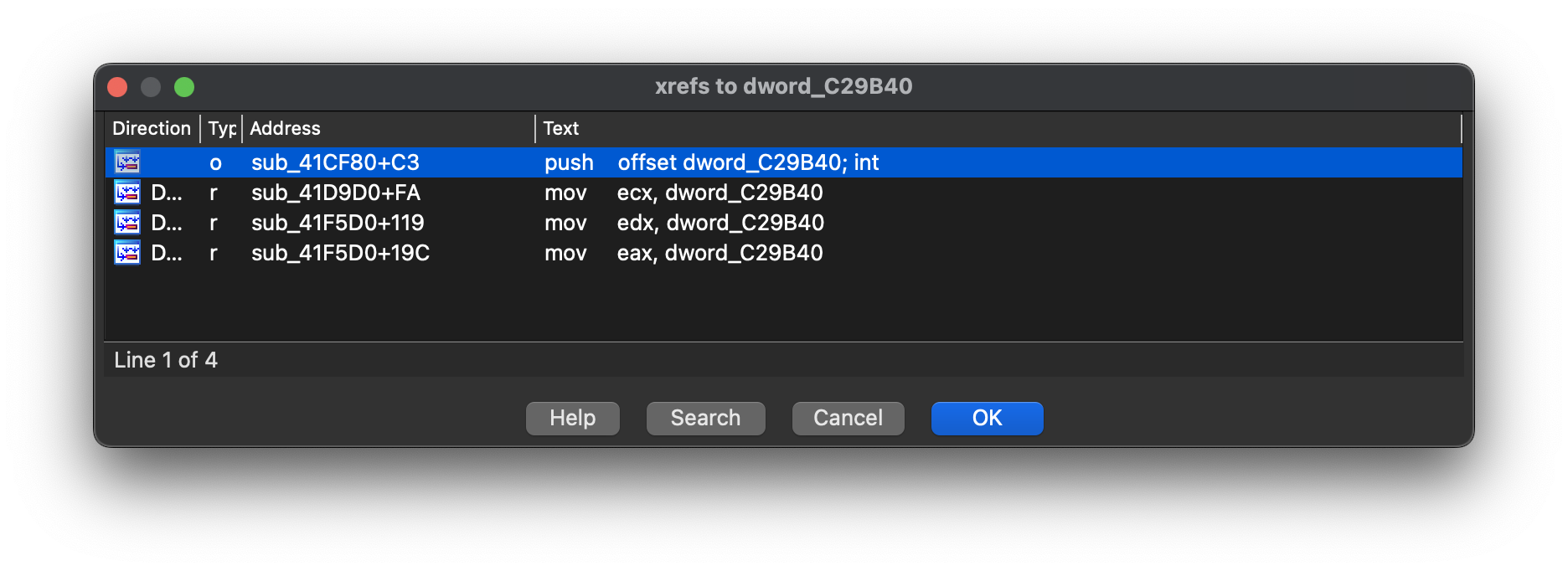
The first xref is the function we just analyzed, and the second is DeleteObject(dword_C29B40); in sub_41D9D0.
The third and fourth xrefs are in sub_41F5D0, and both are presumably the parts that display the easter egg image.
Logic That Triggers the Easter Eggs
sub_41F5D0 (1)
Irrelevant parts have been omitted.
v3 = GetAsyncKeyState;  // <-- pay attention to v3
while ( 1 )
{
    // ...
    if ( (int (*)())dword_A570EC != sub_41CC30 )
    {
        dword_A570EC = (int)sub_41CC30;
        sub_41CE50();
    }
    v4 = sub_41F340();  // <-- pay attention to v4
    String[0] = 0;
    sub_4097F0(-100, -100, 0, (wchar_t *)String, 0);
    if ( v4 == 8 && v3(17) && v3(16) )
        ++v41;
    if ( v41 <= 11 )
        goto LABEL_50;
    if ( v4 == 73 )
        ++v40;
    if ( v40 > 0 )
    {
        if ( v4 == 78 )
            ++v38;
        if ( v38 > 1 && v4 == 79 )
            ++v39;
    }
    if ( v39 <= 0 )
        goto LABEL_50;
    if ( v39 >= 10 )
    {
        if ( v4 == 8 )
        {
            if ( !v3(17) || !v3(16) )
                goto LABEL_50;
            sub_406910(dword_C278E0, 100, 100);     // <-- display second easter egg
            while ( (sub_41F340() & 0x80000000) != 0 );
        }
        else
        {
            if ( v4 != 65 || !v3(83) || !v3(69) || !v3(32) || !v3(16) || v3(17) )
                goto LABEL_50;
            sub_406910(dword_C278E0, 100, 100);     // <-- display second easter egg
            while ( (sub_41F340() & 0x80000000) != 0 );
        }
        dword_A570EC = (int)sub_40E030;
        sub_41CE50();
        dword_45B36C = 1;
    }
    else
    {
        if ( v4 == 8 )
        {
            if ( !v3(17) || !v3(16) )
                goto LABEL_50;
            sub_406910(dword_C29B40, 100, 100);     // <-- display first easter egg
            while ( (sub_41F340() & 0x80000000) != 0 );
        }
        else
        {
            if ( v4 != 65 || !v3(83) || !v3(69) || !v3(32) || !v3(16) || v3(17) )
                goto LABEL_50;
            sub_406910(dword_C29B40, 100, 100);     // <-- display first easter egg
            while ( (sub_41F340() & 0x80000000) != 0 );
        }
        dword_A570EC = (int)sub_40E030;
        sub_41CE50();
    }
    LABEL_50:
    // ...
}
It looks complex, but let’s work through it step by step. First, when the easter egg trigger condition is not met, it appears to skip the key combination check via goto LABEL_50;.
sub_406910(dword_C29B40, 100, 100); looks like the function that displays the easter egg — let’s figure out under what conditions it gets called.
if ( v39 >= 10 )
    // second easter egg
else
    if(v4 == 8)
        if(!v3(17) || !v3(16))
            goto LABEL_50;
            sub_406910(dword_C29B40, 100, 100);
    else
        if (v4 != 65 || !v3(83) || !v3(69) || !v3(32) || !v3(16) || v3(17))
            goto LABEL_50;
            sub_406910(dword_C29B40, 100, 100);
We need to figure out what v3 and v4 are.
v3 = GetAsyncKeyState;v3 points to GetAsyncKeyState.
According to the MSDN documentation for GetAsyncKeyState,
the function returns an appropriate value if the key corresponding to the virtual key code passed as its argument is pressed at the time of the call.
For information on virtual key codes, refer to the MSDN Virtual-Key Codes documentation.
v4 = sub_41F340();v4 stores the return value of sub_41F340. Let’s take a closer look.
sub_41F340
WPARAM sub_41F340()
{
    // ...
    while ( 1 )
    {
        // ...
        if ( message == 256 )
        {
            v1 = sub_409550(Msg.wParam) == 0;
            result = Msg.wParam;
            if ( v1 )
            {
                switch ( Msg.wParam )
                {
                    case 8u:
                    case 9u:
                    case 0xDu:
                    case 0x15u:
                    case 0x1Bu:
                    case 0x21u:
                    case 0x22u:
                    case 0x25u:
                    case 0x26u:
                    case 0x27u:
                    case 0x28u:
                    case 0x2Eu:
                        return result;
                    default:
                        goto LABEL_14;
                }
            }
            return result;
        }
    LABEL_14:
        // ...
    }
    // ...
    return -2;
}
When the message code is WM_KEYDOWN (256), it determines which key was pressed via wParam.
If the key code is one of VK_BACK(8), VK_TAB(9), VK_ENTER(0xD), VK_HANGUL(0x15), VK_ESCAPE(0x1B), VK_PRIOR(0x21),
VK_NEXT(0x22), VK_LEFT(0x25), VK_UP(0x26), VK_RIGHT(0x27), VK_DOWN(0x28), or VK_DELETE(0x2E),
it returns that key code.
sub_41F5D0 (2)
Let’s figure out what v39 is.
if ( v4 == 8 && v3(17) && v3(16) )
    ++v41;
if ( v41 <= 11 )
    goto LABEL_50;
if ( v4 == 73 )
    ++v40;
if ( v40 > 0 )
    if ( v4 == 78 )
        ++v38;
    if ( v38 > 1 && v4 == 79 )
        ++v39;
if ( v39 <= 0 )
        goto LABEL_50;
Since we’ve already analyzed what v3 and v4 are, the logic here should be straightforward to parse. Let’s go through it from the top.
-
Pressing
VK_BACK(8)whileVK_CONTROL(17)andVK_SHIFT(16)are held increases v41 by 1. -
If v41 is 11 or less,
goto LABEL_50;exits the key-checking logic. In other words, you need to press Backspace at least 12 times while holding Control and Shift for the rest of the code to execute. -
Pressing
I(73)increments v40 by 1. -
While v40 is greater than 0 — that is, after pressing I at least once — pressing
N(78)increments v38 by 1. -
While v38 is greater than 1 — that is, after pressing N at least twice — pressing
O(79)increments v39 by 1.
This covers the key sequence common to both easter eggs. In summary: hold Ctrl + Shift and press Backspace at least 12 times, then press I at least once, N at least twice, and O at least once. But what does INNO mean? Given that the developer’s email address shown in the easter egg is innoboy@nownuri.net, it seems to be taken from their email handle.
Anyway, let’s revisit the logic for displaying the first easter egg.
if ( v39 >= 10 )
    // second easter egg
else
    if(v4 == 8)
        if(!v3(17) || !v3(16))
            goto LABEL_50;
        sub_406910(dword_C29B40, 100, 100);
    else
        if (v4 != 65 || !v3(83) || !v3(69) || !v3(32) || !v3(16) || v3(17))
            goto LABEL_50;
        sub_406910(dword_C29B40, 100, 100);
For the easter egg to trigger, v39 must be less than 10, and either v4 == 8 with !v3(17) || !v3(16) must hold… wait, let me reread that.
To trigger the easter egg, v39 must be less than 10, and you must press Backspace while holding Control and Shift.
Let’s also look at the code path when v4 != 8. Since goto LABEL_50; fires when the condition inside the if statement is true, we need to negate it:
the easter egg triggers when v4 == 65 && v3(83) && v3(69) && v3(32) && v3(16) && !v3(17).
In other words, pressing A while holding S, E, Space, and Shift — but not Control — triggers the easter egg.
This is the path I discovered during this fresh reversing session.
Now let’s look at the logic for displaying the second easter egg.
if ( v39 >= 10 )
    if ( v4 == 8 )
        if ( !v3(17) || !v3(16) )
            goto LABEL_50;
        sub_406910(dword_C278E0, 100, 100);
    else
        if ( v4 != 65 || !v3(83) || !v3(69) || !v3(32) || !v3(16) || v3(17) )
            goto LABEL_50;
        sub_406910(dword_C278E0, 100, 100);
Everything else is the same, but v39 must be 10 or greater — meaning you need to press O at least 10 times.
Summary
The key combinations to trigger the easter eggs are as follows:
- Hold Control + Shift and press Backspace at least 12 times.
- Press I at least once.
- Press N at least twice.
- Press O. Pressing it fewer than 10 times shows the first easter egg; pressing it 10 or more times shows the second.
- Either press Backspace while holding Ctrl + Shift, or press S + E + Shift + Space and then A without holding Control.
Closing Thoughts
Honestly, I’m not a great writer. When I try to put my thoughts into words, things tend to come out disorganized and hard to read. I also have a habit of reusing the same words and phrases repeatedly. This is the first post going up on this blog, and to be honest, there were a few drafts I abandoned midway because they just weren’t working — and even this post took about a week to write initially.
If anything seems unclear or needs correction, please let me know in the comments.